Hearing Saver3.1
Publisher Description
Save Your Ears
--> You need to open this app at least once after first installing or upgrading it for it to work! <--
--> I am currently unable to maintain this application, as I no longer own an Android device for testing and the events I use to trigger the volume changes are not present in emulators. If you're interested in taking over maintenance, please contact me. <--
Hearing Saver is the simple way to avoid accidentally hurting your ears when plugging in or unplugging your Android device's wired or Bluetooth headset. Hearing Saver operates in the background to protect your ears automatically. It uses very little resources, and simply waits for the signal that your headset has been unplugged or plugged in.
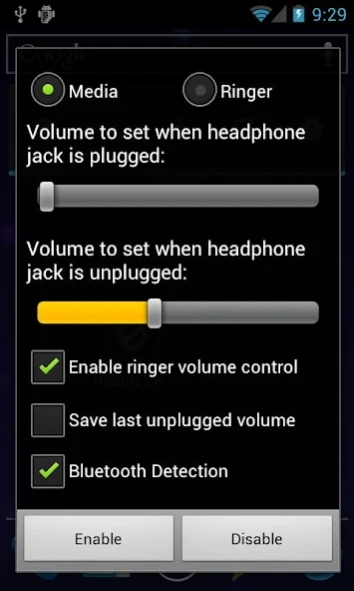
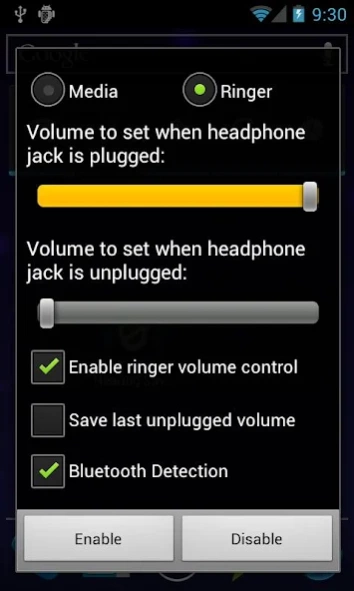
After initial setup, Hearing Saver should work without further input from you. To setup the app, open it. You will be presented with the Setup screen. It contains a number of controls, and they each interact to allow you to customize Hearing Saver's operation. From top to bottom:
- Media/Ringer Selector Buttons - These allow you to select what the two sliders, described below, control. If you have not enabled Ringer volume control, the Ringer radio button will be disabled.
- Plugged/Unplugged Sliders - These control the volume that will be set when the headset is plugged in or unplugged, respectively. The volume that these refer to is indicated by the Radio buttons at the top.
- Enable Ringer Volume Control Checkbox - This enabled/disables Hearing Saver's ability to set your device's Ringer/Notification volume. It is off by default so you don't miss a call!
- Save Last Unplugged Volume Checkbox - If this is checked, the bottom slider will be disabled and Hearing Saver will remember the last volume you manually set while the headset was unplugged, and reset to that volume when the headset is unplugged again.
- Bluetooth Detection - Enabled by default, this tells Hearing Saver to set your volume when a Bluetooth audio device is connected/disconnected.
This app is licensed under the Apache License. More information available at https://gitlab.com/jakebasile/hearing-saver
-- Known Issues --
- Bluetooth Disconnect happens after a long delay. This is beyond my control, as it is a delay in my code receiving the broadcast.
- Only works on Unplug on the HTC Incredible. This is because HTC broke the standard method that I hook into in order to change the volume.
- Sometimes doesn't upgrade very well. If you are having problems, please try uninstalling and reinstalling.
About Hearing Saver
The company that develops Hearing Saver is Jake Basile. The latest version released by its developer is 3.1. This app was rated by 8 users of our site and has an average rating of 4.4.
To install Hearing Saver on your Android device, just click the green Continue To App button above to start the installation process. The app is listed on our website since 2013-01-24 and was downloaded 274 times. We have already checked if the download link is safe, however for your own protection we recommend that you scan the downloaded app with your antivirus. Your antivirus may detect the Hearing Saver as malware as malware if the download link to com.jakebasile.android.hearingsaver is broken.
How to install Hearing Saver on your Android device:
- Click on the Continue To App button on our website. This will redirect you to Google Play.
- Once the Hearing Saver is shown in the Google Play listing of your Android device, you can start its download and installation. Tap on the Install button located below the search bar and to the right of the app icon.
- A pop-up window with the permissions required by Hearing Saver will be shown. Click on Accept to continue the process.
- Hearing Saver will be downloaded onto your device, displaying a progress. Once the download completes, the installation will start and you'll get a notification after the installation is finished.
Program Details
System requirements
Download information
Pricing
Version History
version 3.1
posted on 2013-01-24
- Better Support for Low Resolution Screens (Thanks bhm!),- Happy Thoughts
version 1.6
posted on 2011-04-24
Several fixes and updates
